Circle vs Mighty Networks: Which One Fits Your Community?
Circle vs Mighty Networks on pricing, transaction fees, live streaming, member export and branded apps, from each vendor's own pages (checked 11 November 2026), with a year-one cost table and who each one suits.
Choosing between Circle vs Mighty Networks is closer than most comparisons make it look: both are hosted community platforms with courses, live streaming, events and member apps, at similar prices. The short version: Mighty Networks gives you more live-streaming room and reaches its lowest transaction fee on a cheaper plan, while Circle is clearer about letting you export your member list and lays its community out in spaces with a fixed number per plan. Neither is better for everyone. The right one depends on whether your community runs on live sessions, on sales, or on discussion.
Everything below comes from each company’s own pricing page and help centre, read on 11 November 2026. This is a comparison of what the plans include, not a hands-on review: we say so because prices and limits change, and you should check both pages again before you pay.
Not sure a hosted app is right at all? Our free Platform Finder Scorecard compares hosted apps, social groups, course platforms and your own site in five questions.
Circle vs Mighty Networks at a glance
Here is how the two line up on the points that change what you pay and what you can do. Plans are grouped by price, entry plan first.
Point | Circle | Mighty Networks |
|---|---|---|
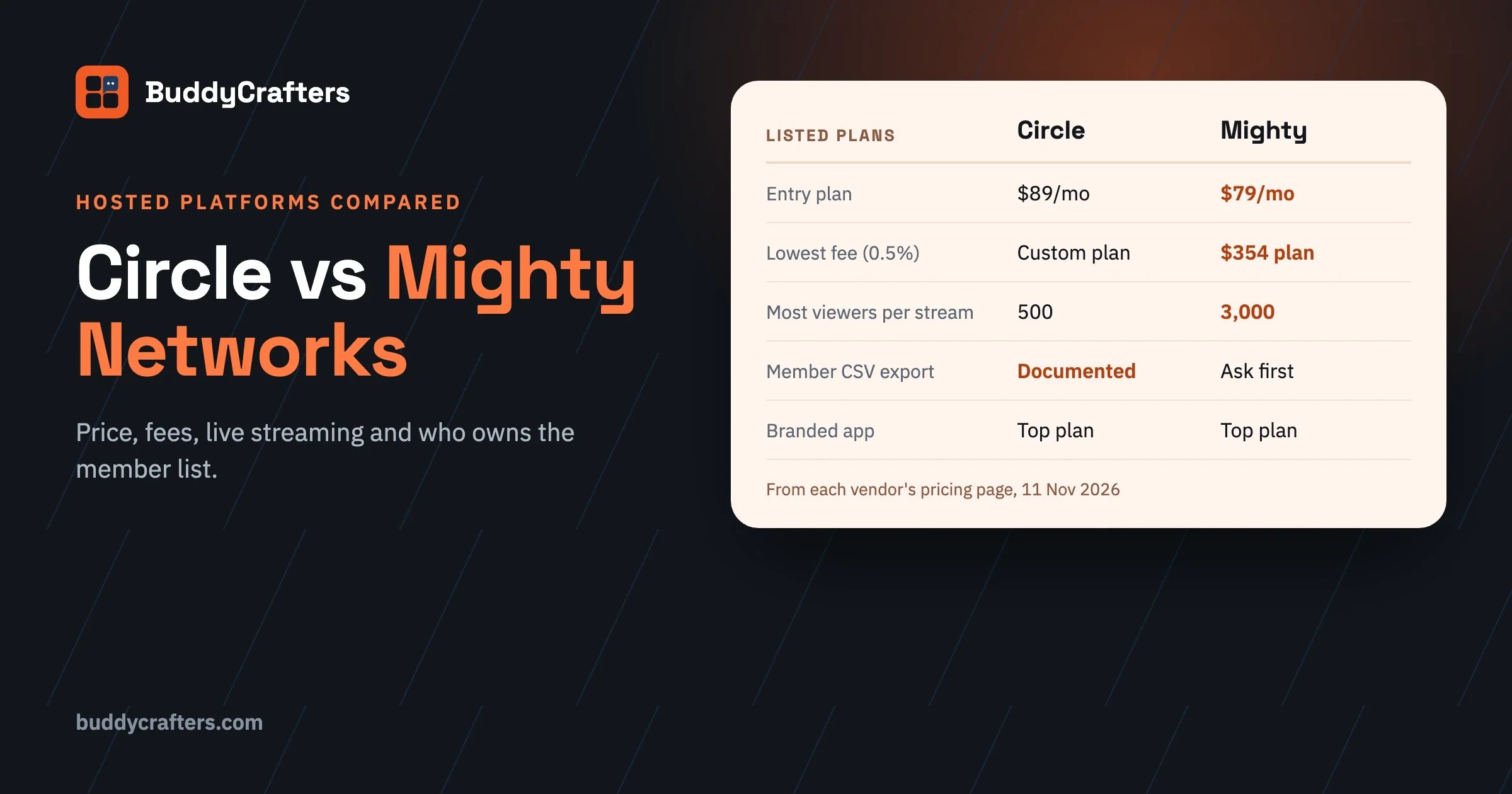
Entry plan | Professional, $89 a month (annual billing) | Launch, $79 a month or $950 a year |
Middle plans | Business $199, Scale $419 a month | Scale $179, Growth $354 a month |
Top plan | Circle Plus, custom price | Mighty Pro, custom price |
Members | Unlimited on every plan | Unlimited on every plan |
Transaction fee | 2%, then 1%, then 0.5% on Circle Plus | 2%, then 1%, then 0.5% from Growth |
Live streaming | 100 to 500 attendees per stream | 100 to 3,000 viewers per stream |
Branded mobile app | Circle Plus only | Mighty Pro only |
Member CSV export | Documented in the help centre | Not stated on the pricing page |
Free trial | 14 days, no card | 14 days, no card |
Prices are in US dollars, before tax, as listed on Circle’s pricing page and Mighty Networks’ pricing page on 11 November 2026. Circle shows its prices based on annual billing; Mighty shows monthly prices with an annual option.
What is Circle?
At its core, Circle is a hosted community platform. You build your community inside Circle’s software, on a Circle address or your own domain, and members use it in a browser or Circle’s iOS, Android and desktop apps. You do not install or maintain anything.
A Circle community is organised into spaces: separate areas for discussion, courses, events or chat. Each plan sets how many spaces you get (20 on Professional, 30 on Business, 100 on Scale), along with how many admins and moderators can run them. Courses, events and live streams are included from the entry plan.
In practice, Circle tends to suit communities that are organised by topic: a membership with several discussion areas, a course with a community beside it, or a customer community split by product.
What is Mighty Networks?
Like Circle, Mighty Networks is a hosted community platform, aimed at creators and brands who want community, courses, events and live streaming in one place. Members join through the web or Mighty’s apps, and the host runs everything from the network’s settings.
Its plans are built around how much live and media you need: live-streaming hours, viewers per stream and storage go up with each plan. The top plan, Mighty Pro, adds your own branded apps in the app stores.
So Mighty tends to suit communities where live sessions are the heart of it: cohorts, coaching groups, memberships with regular live calls, and creators who stream to a large audience.
Circle vs Mighty Networks pricing
On sticker price, Mighty Networks is a little cheaper at each level, and Circle’s prices are quoted on annual billing. The difference is small enough that it should rarely decide things on its own. Here are the full plans, as listed on 11 November 2026.
Circle plans
Plan | Price | What changes |
|---|---|---|
Professional | $89 a month, annual billing | 3 admins, 10 moderators, 20 spaces, 2% transaction fee |
Business | $199 a month, annual billing | 5 admins, 15 moderators, 30 spaces, 1% fee |
Scale | $419 a month, annual billing | 10 admins, 100 moderators, 100 spaces, 1% fee |
Circle Plus | Custom | Unlimited admins and moderators, 0.5% fee, branded iOS and Android apps |
Mighty Networks plans
Plan | Price | What changes |
|---|---|---|
Launch | $79 a month, or $950 a year | 3 hosts, 10 moderators, 2% transaction fee, 20 live hours a month |
Scale | $179 a month | 5 hosts, 15 moderators, 1% fee, 30 live hours a month |
Growth | $354 a month | 10 hosts, 100 moderators, 0.5% fee, 40 live hours, 1 TB storage |
Mighty Pro | Custom | Unlimited hosts, 0.5% fee, 50 live hours, 4 TB storage, branded apps |
How much does Mighty Networks Pro cost?
There is no published price for Mighty Pro. The pricing page asks you to request a quote. The same goes for Circle Plus, Circle’s top plan. Both are aimed at larger brands that want their own apps in the app stores, so expect a sales conversation rather than a checkout page.
Is there a free plan?
Neither lists a free plan. Both offer a 14-day free trial with no credit card. Mighty’s trial runs on its Growth features, so remember that a cheaper plan will have less than what you tried.
Transaction fees: the cost that grows with you
The monthly price is easy to compare. The transaction fee is the number that quietly matters more once you sell memberships, courses or event tickets, because it is taken from every sale on top of your payment processor’s own fee.
Both platforms charge 2% on the entry plan and 1% on the next. The difference is where the lowest fee starts:
- Mighty Networks drops to 0.5% on Growth, at $354 a month.
- Circle stays at 1% on Scale, at $419 a month, and only reaches 0.5% on custom-priced Circle Plus.
To see what that means, take a community selling $10,000 a month in memberships. The platform’s cut, before card fees, would be:
Fee | Per month on $10,000 of sales | Per year |
|---|---|---|
2% | $200 | $2,400 |
1% | $100 | $1,200 |
0.5% | $50 | $600 |
If you sell a lot through the platform, work this out with your own numbers before choosing a plan. Moving up a plan to halve the fee can pay for itself. If you sell little or nothing (a free community, or one where payments happen elsewhere), the fee hardly matters and the features should decide.
What a year costs: three example communities
Plan price and transaction fee together give a fairer picture than either alone. Here is a year on each plan for three made-up communities, using the listed prices (Circle Pro is the Professional plan; Mighty’s Launch on its annual price, every other plan at its listed monthly price times twelve). Card processing fees and tax come on top in every case.
Plan | $3k/mo sales | $20k/mo sales |
|---|---|---|
Circle Pro | $1,788 | $5,868 |
Circle Business | $2,748 | $4,788 |
Circle Scale | $5,388 | $7,428 |
Mighty Launch | $1,670 | $5,750 |
Mighty Scale | $2,508 | $4,548 |
Mighty Growth | $4,428 | $5,448 |
With no sales at all, a year is just the plan price: $950 for Mighty Launch on annual billing, $1,068 for Circle Professional, rising to $5,028 for Circle Scale. Two things stand out. First, for a small or free community the entry plans are close, and Mighty’s annual Launch price is the lowest on the list. Second, the cheapest plan at high sales is not the one with the lowest fee: at $20,000 a month, Mighty Scale (1%) still costs less over a year than Mighty Growth (0.5%).
Want to compare these plans with running your own site? Our free community website cost calculator puts a monthly and first-year range on both options.
When does moving up a plan pay for itself?
A higher plan pays for itself through the fee once your monthly sales pass the point where the fee you save equals the extra plan price. On the listed prices:
- Circle Professional to Business (2% to 1%): from about $11,000 a month in sales.
- Mighty Launch to Scale (2% to 1%, Launch on its monthly price): from about $10,000 a month.
- Mighty Scale to Growth (1% to 0.5%): from about $35,000 a month.
- Circle Business to Scale keeps the same 1% fee, so it never pays for itself on fees; you move up for more admins, spaces and live capacity.
Below those points, move up only for the features. Above them, the bigger plan is the cheaper one.
Live streaming and events
This is the clearest difference between the two. Mighty Networks gives more live capacity at every level, and much more at the top.
Level | Circle (attendees per stream) | Mighty Networks (viewers per stream) |
|---|---|---|
Entry | 100 | 100 |
Middle | 200 (Business) | 200 (Scale) |
Upper | 500 (Scale) | 1,000 (Growth) |
Top | Flexible (Circle Plus) | 3,000, up to 10,000 for an extra fee (Mighty Pro) |
Circle’s pricing also lists live rooms for smaller interactive sessions (15 participants on Professional up to 50 on Scale) and a number of live hours per plan. Mighty lists live hours per month: 20 on Launch, 30 on Scale, 40 on Growth and 50 on Mighty Pro.
If you run a weekly call for fifty people, either platform is enough. If you stream to several hundred people, or plan to, Mighty’s numbers give you more headroom for the money. For big one-off events, you can also run the stream elsewhere and link to it, which is what many communities do on any platform.
Can you export your members?
For a site called BuddyCrafters this is the question we care about most, because it decides whether you could ever leave. A community you cannot take with you is one you rent.
Circle documents it clearly. Its help centre explains how admins export a CSV of their members, including names, email addresses, join dates, tags, profile fields (custom ones too), engagement counts, last-active dates and email preferences. The file is emailed to the admin. Circle’s pricing page lists bulk import and export on every plan.
On the other side, Mighty Networks does not mention member export on its pricing page, and its help centre did not load when we checked. That does not mean it is missing; it means you should get a clear answer before you commit. Ask Mighty’s team two questions: can hosts download members with their email addresses, and on which plan?
Whichever you choose, export your member list once a month and keep it somewhere you control. It costs five minutes, and it is the difference between moving your community and starting again.
Courses
Both platforms include courses from the entry plan, so you can sell or run a course inside the same place your community talks. For most communities that pair courses with discussion, either will do the job.
If the course is the main product and the community is the extra, compare both with a course-first platform as well. Kajabi, Teachable and Thinkific are built around the course, with community added on, which suits a different business. Our guide to creating an online course website walks through that choice, including self-paced versus cohort courses.
Branded mobile apps
On every plan below the top one, members use Circle’s or Mighty’s own app, with your community inside it. Your own app, under your name in the App Store and Google Play, comes only with the top plans: Circle Plus and Mighty Pro, both custom-priced.
For most communities the standard app is fine. Members care far more about getting a notification when someone replies than about whose logo is on the app icon. A branded app starts to matter for larger brands, paid memberships at a high price, and communities where the app itself is part of what people pay for.
Which one should you choose?
Match the platform to how your community actually runs.
Choose Mighty Networks if...
- Live sessions are the core: cohorts, coaching calls, workshops, or streams to hundreds of people.
- You sell a lot through the platform and want the 0.5% fee without a custom contract.
- You want the most streaming hours and storage for the money.
Choose Circle if...
- Your community is organised by topic and you want separate spaces for each.
- Owning and exporting your member data is a must, and you want it documented today.
- Your live sessions are regular and modest in size, so streaming limits will not bite.
Choose neither if...
- You only need conversation and cannot justify a monthly fee yet.
- You need the community on your own website, under your own brand, with no platform fee on sales.
- The course is the product and the community is a bonus.
The best test is the free trial. Set up the same small space on both, invite five real members, and run one live session on each. You will learn more in a week than from any comparison, including this one.
If neither fits: Circle and Mighty Networks alternatives
A lot of people searching this comparison end up somewhere else. The usual alternatives, and who they suit:
- Skool bundles a community, courses and a points system in one simple app. Our sister site has a hands-on Skool vs Circle review if that is your shortlist.
- Discord is free and strong for live chat, but you cannot email your members and good answers get buried. Read our Discord alternatives guide before you build on it.
- A course platform such as Kajabi, Teachable or Thinkific, when the course comes first.
- Your own site, when owning the members, the brand and the rules matters most. It costs more effort to set up and usually less as you grow; our guide to self-hosted vs hosted community platforms covers the trade-off.
BuddyCrafters is part of Wbcom Designs, which makes BuddyNext, a self-hosted community engine for WordPress. It only fits the last option on this list, and we mark it as ours. If a hosted app suits you better, use the hosted app.
Questions to ask before you pay
Pricing pages answer most things, but not all. Before you commit to either platform for a year, get written answers to these, from the help centre or the sales team:
- Can I export my members with their email addresses, on my plan? And can I export posts, course progress and payment history, or only the member list?
- Does my plan include a custom domain? And can I keep links working if I leave?
- Which payments does the transaction fee apply to? Memberships, courses, event tickets, or all of them?
- What happens when I go over a limit, such as live hours, viewers per stream or storage? Is there an overage fee, or does the stream stop?
- What happens to members’ subscriptions if I change plan, or move to another platform later?
- Which features did my trial include that my chosen plan does not? (Mighty’s trial runs on Growth features.)
A vendor that answers these clearly is easier to live with for years. If an answer is vague, treat that as the answer.
Your first week on either platform
Whichever you pick, the first week decides more than the software does. A community that feels empty on day one rarely recovers, on any platform.
- Start with three to five spaces, not twenty. You can always add more; empty ones make a new community feel dead.
- Write the welcome post first, telling a new member exactly what to do: introduce themselves, answer one question, join a thread.
- Seed real conversation before anyone arrives: ten or so genuine questions and resources.
- Invite 20 founding members personally, and run one live session in the first week.
- Turn on email notifications and a digest, so people hear when someone replies to them.
Our free Community Launch Checklist turns this into 38 steps for the first 90 days, and works the same on Circle, Mighty Networks or anywhere else.
Switching later: what moves and what does not
Plans change, prices rise and communities outgrow their first home. If you might move one day, set yourself up for it now:
- Export members regularly, with email addresses, while you are happy and nothing is urgent.
- Keep your course files (videos, slides, worksheets) in your own storage, not only inside the platform.
- Use your own domain if your plan allows it, so links people bookmark can point somewhere else later.
- Collect emails outside the platform, for example through a newsletter, so you can always reach members.
When the time comes, our free Community Migration Checklist covers the move step by step, with notes for Circle and Mighty Networks. We also run done-for-you migrations, including Mighty Networks communities moving to a site of their own.
Frequently asked questions
Is Circle or Mighty Networks cheaper?
Mighty Networks is slightly cheaper at each level on its listed prices: $79 against $89 at entry, $179 against $199 in the middle. Circle’s prices are based on annual billing. Transaction fees can matter more than the plan price if you sell through the platform, and Mighty reaches the lowest fee (0.5%) on a cheaper plan.
Which has better live streaming?
Mighty Networks lists more viewers per stream at the upper plans (1,000 on Growth, 3,000 on Mighty Pro) against Circle’s 500 on Scale. At entry level both list 100.
Can I use my own domain?
Circle lists a custom domain on every plan. Mighty Networks lists adding a custom domain as a feature, but its pricing page does not make clear which plans include it, so check with Mighty before you buy.
Can I get my own app?
Only on the top, custom-priced plans: Circle Plus and Mighty Pro. Every other plan uses the platform’s own apps.
Is this a hands-on review?
No. It compares the plans each company lists on its own pricing page and help centre, read on 11 November 2026. Our hands-on reviews say what we tested and when; see how we review.
Does the transaction fee replace my card processing fee?
No. The platform’s transaction fee is its own cut. Your payment processor charges its usual card fee as well, so budget for both.
Can I move from Mighty Networks to Circle, or the other way?
Yes, but nothing moves automatically between them. Members re-join through invites, and content is rebuilt or imported where the new platform allows. Our guide to moving community members covers the invite side, which works the same between any two platforms.
Pick the kind of platform first
Circle and Mighty Networks are both good at what they do. The bigger decision is usually the one before it: a hosted app, a free social group, a course platform or your own site. Our free Platform Finder Scorecard takes you through it in five questions, so you compare like with like. Then use both free trials to settle it.
Plugins we build and run
We maintain these ourselves, which is why we can support them on your site.
- BuddyNextThe self-hosted community engine for WordPress
- BuddyXFree community theme, Pro when you outgrow it
- ReignPremium community theme. Add pieces, build anything
- JetonomyCommunity forum and Q&A for WordPress
- EventonomyEvents and RSVPs for WordPress communities
- LearnomyCourses and learning communities on WordPress
- ListoraDirectories and listings your members can browse
- SnipShareCode sharing built for developer communities
- WB Ad ManagerAd placements that turn traffic into revenue
- WP Career BoardA job board your community actually uses
- WP Sell ServicesSell services with offers, orders, and payouts
- MediaVersePhotos, video, and media albums for members
- WB GamificationPoints, badges, and rewards that keep members active
- Product RoadmapPublic roadmaps with voting your users trust